
Last updated on
Nov 6, 2026

WI TASC Reimbursement Claim Form 2016-2026 free printable template
pdfFiller is not affiliated with any government organization

Fill out
Complete the form online in a simple drag-and-drop editor.

eSign
Add your legally binding signature or send the form for signing.

Share
Share the form via a link, letting anyone fill it out from any device.

Export
Download, print, email, or move the form to your cloud storage.
Why pdfFiller is the best tool for your documents and forms


End-to-end document management
From editing and signing to collaboration and tracking, pdfFiller has everything you need to get your documents done quickly and efficiently.
Accessible from anywhere
pdfFiller is fully cloud-based. This means you can edit, sign, and share documents from anywhere using your computer, smartphone, or tablet.
Secure and compliant
pdfFiller lets you securely manage documents following global laws like ESIGN, CCPA, and GDPR. It's also HIPAA and SOC 2 compliant.
What is WI TASC Reimbursement Claim Form
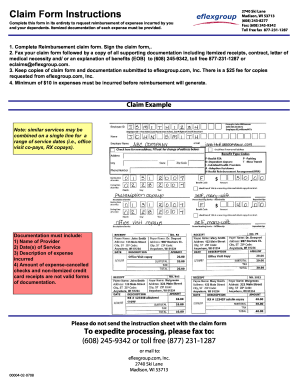
The Reimbursement Claim Form is a business document used by employees to request reimbursement for eligible expenses incurred for themselves or their dependents.
pdfFiller scores top ratings on review platforms




Its easy and helps me get contracts in and out quickly
I really love this program! It's easy to use and makes my documents look so professional!
Once you understand how everything works. its a pretty awesome site.
This has given my companies ability to change PDF to word with minimal effort.
EASY TO USE
EASY TO USE, BEST OUT THERE
so far so good starting trucking business and this is super helpful so far
Who needs WI TASC Reimbursement Claim Form?
Explore how professionals across industries use pdfFiller.

WI TASC Reimbursement Claim Form is needed by:
-
Employees seeking reimbursement for expenses
-
HR departments managing employee benefits
-
Finance teams processing expense claims
-
Employers providing flexible spending accounts
-
Contractors with reimbursable expenses
Comprehensive Guide to WI TASC Reimbursement Claim Form
What is the Reimbursement Claim Form?
The Reimbursement Claim Form is a tool designed to assist employees in requesting reimbursement for eligible expenses incurred during their employment. This form is essential for maintaining accurate financial records and ensures compliance with IRS regulations. An itemized documentation is crucial when using this form to substantiate expenses effectively.
Using the reimbursement claim form streamlines the process for employees, allowing them to efficiently gather and submit their relevant expense data. By providing clear guidelines on eligible expenses, it helps users navigate the reimbursement process with ease.
Purpose and Benefits of the Reimbursement Claim Form
The primary purpose of the reimbursement claim form is to simplify financial management for employees, ensuring they receive the benefits owed to them. This form not only assists in filing claims accurately but also reinforces compliance with company policies regarding expense submissions.
Key advantages of utilizing the reimbursement claim form include:
-
Ensuring proper reimbursement for valid expenses
-
Facilitating adherence to company guidelines
-
Streamlining the expense reporting process
Eligibility Criteria for the Reimbursement Claim Form
Eligibility to use the reimbursement claim form is generally limited to employees and their legal dependents. It's essential to understand the distinction between eligible and ineligible expenses, as this will determine the reimbursement's success.
Common criteria include:
-
Employee status within the organization
-
Nature of the expenses incurred
-
Compliance with company policies and IRS regulations
How to Fill Out the Reimbursement Claim Form Online
Filling out the reimbursement claim form online is a straightforward process. Follow these detailed steps to ensure accuracy:
-
Access the form on the pdfFiller platform.
-
Complete each section with itemized documentation and details of incurred expenses.
-
Review the filled form for accuracy and ensure all necessary documentation is attached.
-
Submit the form electronically through the online interface.
For optimal experience, consider utilizing tools available on pdfFiller to aid in completing and submitting your reimbursement claim form.
Submission Methods for the Reimbursement Claim Form
Once completed, there are several methods to submit the reimbursement claim form. These options include:
-
Online submission through pdfFiller
-
Faxing the completed form
-
Mailing physical copies, if necessary
Regardless of the method chosen, it's vital to confirm the successful delivery of your form and obtain a receipt for records.
Common Errors and How to Avoid Them While Filling the Form
While completing the reimbursement claim form, there are potential pitfalls that users may encounter. Common mistakes include:
-
Leaving fields incomplete
-
Submitting incorrect documentation
-
Failing to double-check for accuracy
To enhance submission success, take time to review all entries carefully before sending the form.
What Happens After You Submit the Reimbursement Claim Form?
After submitting the reimbursement claim form, employees can expect a structured review process. The timeline may vary, but typically involves:
-
Review of the submitted documentation by the finance department
-
Potential outcomes including approvals, requests for additional information, or rejections
Staying informed about this process will help manage expectations regarding reimbursements.
Security and Compliance of Your Reimbursement Claim Form
Your information's safety and compliance are vital when using the reimbursement claim form. pdfFiller employs stringent security measures, including encryption and adherence to privacy regulations.
Key security features include:
-
256-bit encryption for data protection
-
Compliance with HIPAA and GDPR regulations
Understanding these measures can reassure users about the confidentiality of their submitted information.
How pdfFiller Enhances Your Experience with the Reimbursement Claim Form
pdfFiller significantly enhances the process of managing your reimbursement claim form through various features. Users can edit text, e-sign documents, and manage forms easily within a cloud-based platform.
Additional benefits include:
-
An intuitive interface for filling forms
-
Convenient document management capabilities
Using pdfFiller not only simplifies the experience but also improves security and access to your forms.
Start Your Reimbursement Claim Process Today
Accessing the reimbursement claim form via pdfFiller is simple and user-friendly. The platform is designed to assist first-time users, providing support throughout the form completion process.
Engaging with the pdfFiller platform allows employees to navigate the reimbursement submission efficiently and effectively.
How to fill out the WI TASC Reimbursement Claim Form
-
1.Access the Reimbursement Claim Form by visiting pdfFiller and searching for the form name in the template library.
-
2.Open the form by clicking on it, which will launch it in the pdfFiller interface for editing.
-
3.Before starting, gather all necessary documentation such as receipts and invoices related to the expenses you are claiming.
-
4.Begin filling out the form by selecting the appropriate fields and entering detailed information about the expenses incurred.
-
5.Document the date, nature, and amount of each expense clearly in their designated fields.
-
6.Check off the specific benefit or service codes that apply to each expense on the form.
-
7.After completing all fields, review the entire form for accuracy and ensure that all required fields are finished.
-
8.Once you are confident everything is correctly filled out, prepare to finalize the form.
-
9.To finalize, use the 'signature' feature in pdfFiller to add your signature, certifying the validity of your claims.
-
10.Save your completed form within pdfFiller, and choose the option to download it as a PDF or submit it directly through the platform.

Who is eligible to use the Reimbursement Claim Form?
The Reimbursement Claim Form is intended for employees seeking reimbursement for eligible expenses incurred for themselves or their dependents, often under employer-sponsored benefits.
What supporting documents are needed for submission?
You will need itemized receipts or documentation for each claimed expense to support your reimbursement request. Ensure all documentation is legible and corresponds with the expenses reported on the form.
How can I submit the Reimbursement Claim Form?
You can submit the Reimbursement Claim Form online through pdfFiller or fax it to your HR department. Make sure to follow any submission guidelines provided by your employer.
What are common mistakes to avoid on this form?
Common mistakes include missing signatures, failing to provide itemized receipts, and not clearly indicating the expenses claimed. Double-check all entries before submission to avoid delays.
Is there a deadline for submitting this form?
Deadlines may vary by employer, but it’s important to submit your reimbursement claim form as soon as possible, generally in line with your employer's expense reporting schedule to ensure timely processing.
What happens after I submit the form?
After submission, the form will be processed by your HR or finance department, who will review your claims against the supporting documentation. Processing times may vary.
Are there any fees associated with using pdfFiller?
pdfFiller may charge fees for premium features, but accessing and completing standard forms typically does not incur any additional costs beyond your subscription or purchase.
Related Forms



Get the latest insights from our blog



If you believe that this page should be taken down, please follow our DMCA take down process
here
.
This form may include fields for payment information. Data entered in these fields is not covered by PCI DSS compliance.